
A field marketer sets up a branded photo station in a hotel ballroom for a product launch. The venue’s event coordinator has already promised guest Wi-Fi, so the setup looks routine. Doors open, and roughly 150 people step in for a photo over the evening. Somewhere in the first hour, the booth’s tablet quietly loses its internet connection.
The first worry is whether the booth still works. It does. A photo booth captures images, applies branded overlays, prints on the spot, and collects guest email addresses and phone numbers with no internet at all. What changes offline is not whether the booth works. It is when the data it collects reaches the marketer, and how safe that data is in the meantime. The value of a brand-activation booth is the lead list it builds, and an offline-mode photo booth holds that list on the device until it can send it. What follows is the mechanism behind that, a dollar figure for what an un-synced list is worth, and a checklist for running a booth where the venue Wi-Fi is dead.
What “Offline Mode” Actually Means on a Photo Booth
An operator who has only run a booth on a stable office network tends to picture offline mode as a stripped-down version of the real thing, with features greyed out until a signal returns. That is not how it works. Offline mode is a deferral mechanism. The booth keeps running every function it can perform locally and quietly sets aside anything that genuinely needs the public internet, rather than failing or freezing.
The split is cleaner than most operators expect. Fully offline, the booth still captures photos and video, processes them on the device, applies branding overlays, templates, and animations, saves everything to local storage, and runs the contact-capture form, so guests enter their email address and phone number exactly as they would on a connected booth. What pauses is the part that has to leave the building: real-time digital delivery by email, SMS, and social posting, live cloud galleries, and sync with a remote dashboard. Photo Booth Solutions describes this partial-function state plainly in its support documentation, noting that its software “can also partially function in offline mode, allowing printing and queueing of Email, SMS and Client Facebook uploads” (Photo Booth Solutions, 2015). The same pattern holds across platforms.
That reframe changes what an operator worries about. The booth does not lose function offline; it banks its output and waits. Printing is the one piece that needs a closer look, because it depends on a kind of connection most people never separate from the internet.
Wi-Fi Is Not the Internet, and the Difference Catches Operators Out
A venue coordinator says, “Yes, we have guest Wi-Fi, the password is on the table card.” The sentence sounds like a green light. To the booth, it answers a different question than the one that matters.
Two separate things hide inside the word Wi-Fi
Two separate things hide inside the word Wi-Fi. The first is a local wireless network, which connects the booth’s own devices to each other, the tablet to the printer, the tablet to a separate sharing station. The second is an internet connection, which is what actually carries email, SMS, social uploads, and dashboard sync out of the building. Printing depends on the local network and needs no internet at all. Lead delivery and sync depend on the internet. A venue can supply one, both, or a version of “Wi-Fi” that is useless to a booth.
That last case is common. LumaBooth’s support documentation tells operators flatly that “you cannot use a venue’s Wifi as the large majority of them disallow different devices from communicating with each other” (LumaBooth, 2026), the client-isolation setting that keeps a tablet from reaching its own printer. HootBooth’s operator knowledge base adds the rest: captive splash-page portals that log a device out on a timer, firewalls and blocked ports, and plain radio congestion. Large venues such as sports arenas and convention centers, HootBooth notes, pack in so many Wi-Fi devices that the interference between them keeps any single device from holding a reliable connection (HootBooth, 2024). Booth.Events is blunter still, telling operators to get off venue Wi-Fi because it is “notorious for all kinds of problems including blocking uploads” (Booth.Events, 2026).

The practical takeaway for a marketer scouting a venue: “the venue confirmed they have Wi-Fi” and “the booth can deliver photos and sync leads” are two different facts, and only the second one decides the night.
Where the Leads Actually Live When the Booth Is Offline
A guest finishes a photo, types their email into the on-screen form, checks the box agreeing to hear from the brand, and walks away expecting the picture in their inbox. The booth is offline, so nothing sends. The useful question is not what the guest sees. It is where that email address just went.
The Local Upload Queue
It went into a local upload queue on the device, written to storage and paired with the photo it belongs to. The contact data is captured, not lost. It simply has not left the building. When the device next reaches a working internet connection with the app running, the queue works through itself. On some platforms the queued items retry and send automatically; on others, including Photo Booth Solutions, an operator has to open the queue and trigger the send by hand after reconnecting (Photo Booth Solutions, 2019). Either way the photo and the contact method travel together, so a delivered photo is also a delivered lead.

The fragility sits in the gap between capture and sync. The queue is only as durable as the single device holding it, and a handful of ordinary actions destroy it before it ever flushes: logging out of the app, deleting the app, a factory reset, a lost or wiped tablet, or a device that simply never gets reconnected. Vendors document this themselves. Simple Booth’s help center warns, in its offline upload queue article, “Do not log out or delete the app with queued items. Doing so will erase the queue,” and notes that data collected through the contact-capture feature sits in that same queue (Simple Booth, 2025). The lead list and the photos share a fate.
This is the reframe the consumer-facing photo booth articles miss. They ask whether the guest will still get their photo. Offline mode answers that one by default, a few hours late. The business question is whether the marketer will get the contact data, and whether it survives the trip back from the venue. That answer depends on operator discipline, not on the software.
The Cost of a Queue That Never Flushes
Take a product-launch activation that runs 150 people through the booth over an evening, with a contact-capture form offering a photo in exchange for an email address. Set the opt-in rate at 50%. That is a deliberately conservative figure: photo booth vendors advertise opt-in rates of 80% and higher on their marketing pages, but no independent benchmark confirms those, so half makes a defensible floor rather than a promise. Fifty percent of 150 guests is 75 opted-in contacts.
What are 75 contacts worth? Enough to matter. Email marketing returns a median of roughly $36 for every $1 spent, according to email-analytics firm Litmus (2026), and opt-ins collected rank among the metrics marketers use to judge the success of live events, tracked by roughly a third of them (G2, 2025). A marketer who can attribute even $20 of downstream value to an average opted-in contact is looking at $1,500 of pipeline from one evening. The precise figure belongs to each marketer’s own program and list economics. The structural point does not change: offline, that entire amount exists only as an unsent queue on a single tablet until the queue flushes.
Here is the asymmetry that should drive how the night is run. An offline event that is closed out correctly costs nothing. The leads arrive a few hours late and the marketer never feels the delay. An offline event where the queue is wiped before it syncs is a total-loss data event for that activation: not a slow night, a zero. Same booth, same 150 guests, same 75 contacts. The only variable between the two outcomes is whether one person confirmed the queue emptied before the device was packed away.
How to Run a Photo Booth at a No-Wi-Fi Venue
A booth deployment at a venue with no reliable internet has three phases, and the phase operators skip is the one that loses leads.
Before the event, bring the connection rather than borrow
Before the event, bring the connection rather than borrow it. Standard operator practice is a travel router paired with a cellular hotspot. Experienced operators carry their own as a matter of course: the operator behind PhotoBoothInfo keeps “one of these small routers with each of my photo booths,” and HootBooth advises having “two options” for connectivity so a single failure is not fatal (HootBooth, 2024). Two hotspots on different carriers beat one, because a venue that smothers one carrier’s signal usually smothers it for the whole room. Then pre-load everything that needs the internet to arrive: branding overlays, templates, presets, and the data-capture form fields all sync from an online dashboard, so they have to be pulled down while the booth is on a known-good connection, not in the venue parking lot. Finish with a test capture and a test queue flush, so the offline path is proven before the first guest.
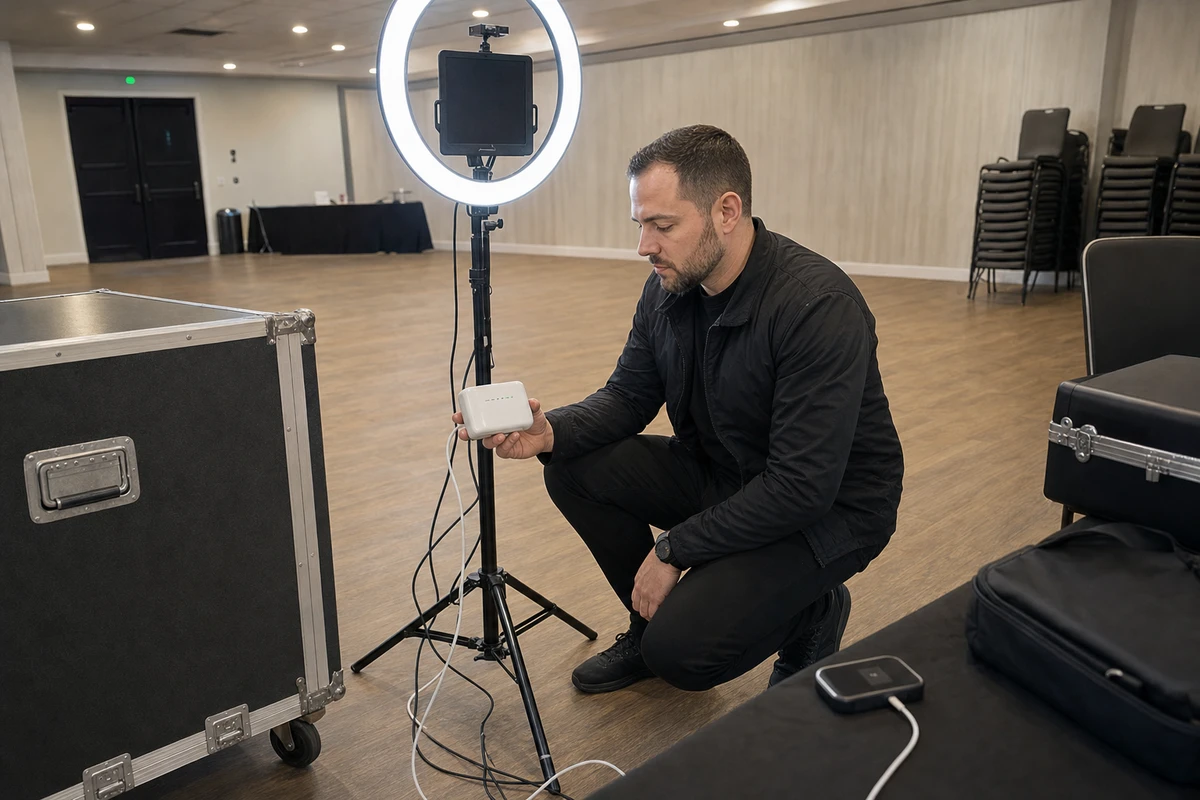
During the event, lean on the local network. Printing runs over a router with no internet, so prints keep coming while delivery is queued. The one thing not to trust is a connection indicator. A tablet can show itself connected to venue Wi-Fi and still fail every upload, so confirm that a real photo actually sends before assuming the booth is online.
After the event is where most preventable lead loss happens. Keep the device powered and on a known-good internet connection until the queue count reaches zero. Do not log out, delete the app, hand the device to someone else, or wipe it until delivery is confirmed. A dashboard queue count and a device “last seen” timestamp are the two readings that prove the night closed. The booth is not done when the last guest leaves. It is done when the queue is empty.
What to Ask Before Booking or Buying an Offline-Capable Booth
The mechanism turns into a short list of questions for any marketer choosing a booth, a software platform, or a rental partner. Each one separates a booth that survives a bad venue from one that merely works until it does not.

Does it queue contact data, not just photos? Some tools handle offline photo delivery well and treat lead data as an afterthought. The form data is the asset, so it has to ride in the queue alongside the images.
Does it warn before a queue-destroying action? An app that throws a clear warning before a logout or an app deletion with items still queued has been designed by people who have watched the failure happen.
Can queue status be checked remotely
Can queue status be checked remotely? A dashboard that shows a pending-item count and a device “last seen” timestamp lets a marketer confirm a venue closed out without standing over the tablet.
Does printing run on a local network with no internet? If it does not, a dead venue connection takes the prints down with the leads.
How long does the app stay logged in while offline? Some platforms keep a session alive for weeks; others time out far sooner. The answer matters for a multi-day install or a booth that travels between sites before it next reconnects, because a silent sign-out can take the queue with it.
Is the captured data exportable
Is the captured data exportable? After the event, the contact list should move cleanly into a CRM or email platform as a CSV or a direct sync, not stay trapped inside the booth software.
A marketer who asks these before signing is buying reliability, not just a booth.
Offline mode is not a fallback to be feared. It is the normal operating reality of marketing inside physical venues, where the Wi-Fi is someone else’s infrastructure and rarely a priority. A well-run offline event loses nothing. The risk was never the missing Wi-Fi. The risk is treating an un-synced queue as a finished job. The discipline that prevents it is small and unglamorous: confirm the queue has hit zero before the device is packed away, and an offline night becomes a non-event.
Sources
- Booth.Events (2026). “Photos Have Not Uploaded or SMS Not Sending” (vendor-published support documentation). https://help.booth.events/article/72-my-photos-are-missing-where-are-my-photos-and-videos
- G2 (2025). “70+ Experiential Marketing Statistics You Should Know in 2025.” https://learn.g2.com/experiential-marketing-statistics
- HootBooth (2024). “Using Wi-Fi Effectively at an Event” (vendor-published knowledge base). https://knowledge.hootboothphotobooth.com/using-wifi-effectively-at-an-event
- Litmus (2026). “State of Email 2026.” https://www.litmus.com/landing-page/state-of-email-2026
- LumaBooth (2026). “Offline QR Code Sharing” (vendor-published support documentation). https://support.lumasoft.co/en/articles/12831756-offline-qr-code-sharing
- Photo Booth Solutions (2015). “Photo Booth Connected — Do I Need an Internet Connection?” (vendor-published support documentation). https://support.photoboothsolutions.com/support/solutions/articles/153923-photo-booth-connected-do-i-need-an-internet-connection-
- Photo Booth Solutions (2019). “Photo Booth Connected Settings — Offline Queue” (vendor-published support documentation). https://support.photoboothsolutions.com/support/solutions/articles/154632-photo-booth-connected-settings-offline-queue
- PhotoBoothInfo. “Wi-Fi Network” (independent operator tips site). https://www.photoboothinfo.com/wifi-network/
- Simple Booth (2025). “Your Offline Upload Queue” (vendor-published help documentation). https://help.simplebooth.com/en/articles/448496-your-offline-upload-queue